

Apple AirTag (1st Gen) 4‑Pack Review: Simple, Seamless Item Tracking for Apple Users
Overview
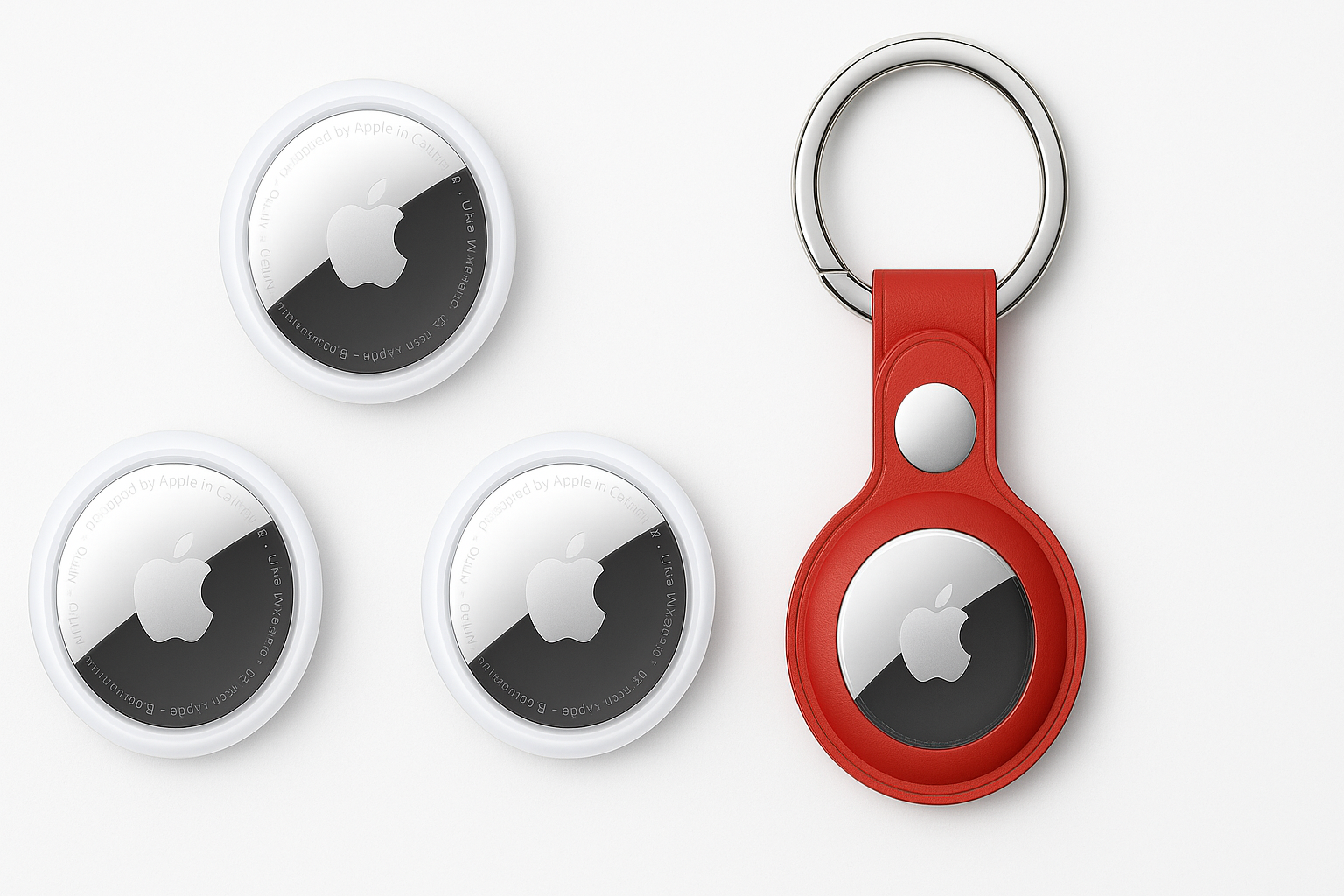
The Apple AirTag (1st Generation) – 4 Pack is Apple’s compact Bluetooth tracker bundle aimed at helping users keep track of personal items such as keys, wallets, luggage, and backpacks. Each AirTag is a small, coin-shaped device that pairs with an iPhone or iPad and leverages the Find My network to locate misplaced or lost belongings.
By selling AirTags in a 4‑pack, Apple targets households or frequent travelers who need multiple tags and want them all managed through the same Apple ID. The product is built around ease of setup, deep iOS integration, and privacy-centric location sharing.
Note: Pricing fluctuates frequently on Amazon. At the time of writing, this 4‑pack is listed around $59.97, but you should check the current listing for the most accurate and up-to-date price.
Key Highlights
- Tight Apple ecosystem integration via the Find My app on iPhone and iPad.
- Simple one‑tap setup: bring an AirTag near your iPhone to pair it, similar to AirPods.
- Ultra‑wideband Precision Finding on compatible iPhone models (with U1 chip).
- Global crowdsourced finding using Apple’s large Find My network.
- Replaceable CR2032 battery with an estimated one‑year life under typical use.
- Compact, lightweight design that fits in accessory holders, key rings, or luggage tags.
- Strong privacy controls, including rotating Bluetooth identifiers and unwanted tracking alerts.
Core Features
1. Design and Build
The AirTag has a minimalist, coin‑like design, with a white plastic front and polished metal back. It is small enough to drop into a bag or slip into a dedicated holder for keys or pet collars.
- Size and weight: Compact and lightweight, easy to carry on everyday items.
- Durability: Rated IP67 for water and dust resistance, meaning it can withstand splashes and brief submersion.
- Customization: Some retail channels and Apple directly offer engraving; when buying on Amazon, engraving may not be available, but there are many third‑party cases and holders.
2. Setup and Connectivity
Setup is one of the defining strengths of AirTag:
- One‑tap setup: Bring the AirTag close to an iPhone or iPad; a prompt appears automatically to connect.
- Assign a name and item type: Label each AirTag (e.g., “Keys”, “Wallet”, “Luggage”) to keep them organized.
- Bluetooth and Ultra‑Wideband: Uses Bluetooth for general proximity tracking and ultra‑wideband (on compatible iPhones) for precise directional guidance.
Once added, AirTags appear in the Items tab of the Find My app, where you can see each one’s last known location.
3. Tracking and Precision Finding
AirTag supports several key tracking modes:
- Play Sound: Make the AirTag emit a sound to help you find it nearby.
- Precision Finding (on supported iPhone models): Uses ultra‑wideband and on‑screen arrows, distance, and haptic feedback to guide you directly to the AirTag.
- Lost Mode: When enabled, if another Apple device detects your AirTag, you receive its updated location. You can also provide a phone number or message so someone who finds it can contact you.
The power of AirTag comes from Apple’s Find My network, which includes millions of iPhones, iPads, and Macs that can anonymously help locate your AirTag.
4. Battery and Maintenance
Each AirTag uses a standard CR2032 coin cell battery:
- User‑replaceable: The back cover twists off to replace the battery.
- Battery life: Apple estimates about a year of typical use before replacement is needed, depending on how often you play sounds or use Precision Finding.
- No charging required: There are no cables or charging docks to worry about, which simplifies ownership.
5. Privacy and Security
Apple has built multiple layers of privacy protections into AirTag:
- Rotating identifiers: Bluetooth identifiers change regularly to prevent long‑term tracking by third parties.
- Unwanted tracking alerts: iPhone users get notified if an unknown AirTag is moving with them; Android users can install a dedicated app to scan for nearby AirTags.
- End‑to‑end encryption: Location data is encrypted, and only the owner can see an AirTag’s location.
These measures are intended to make AirTag useful for tracking items, not people, and to mitigate misuse.
Usage Experience
Everyday Key and Wallet Tracking
For daily use, AirTags excel at solving common misplacement problems:
- Attach an AirTag to a key ring using a small holder.
- Slip another into a wallet pocket or attach it to a card‑style holder designed for wallets.
- Use the Find My app to ring the AirTag when you can’t find your keys or to see the last location where your wallet was detected.
On supported iPhones, Precision Finding can be especially helpful in apartments or houses, guiding you through rooms to the exact spot—such as behind a couch cushion.
Travel: Luggage and Bags
The 4‑pack lends itself well to travel scenarios:
- Place one AirTag in checked luggage, one in a carry‑on, and another in a backpack.
- In busy airports, if your bag is delayed or misplaced, you can see its approximate location as it passes near other Apple devices.
While AirTags don’t replace airline tracking systems, they provide an extra layer of visibility that many travelers find reassuring.
Reliability and Range
AirTag performance depends on Bluetooth range and the density of nearby Apple devices:
- At home or in offices, where many Apple devices are present, location updates tend to be timely and precise.
- In very remote areas, updates may be less frequent due to fewer devices, but the tag still logs its last known position.
Sound volume is generally adequate indoors, though finding a tag buried deep in a couch or inside dense luggage may require both sound and on‑screen guidance.
Strengths
-
Exceptional iOS Integration
AirTags feel like a native part of the Apple ecosystem, with seamless pairing, intuitive controls, and reliable notifications. -
Powerful Crowdsourced Network
The Find My network’s reach is a major advantage, enabling AirTags to be located far beyond standard Bluetooth range. -
Easy, Low‑Maintenance Ownership
No charging, simple battery replacement, and minimal configuration make AirTags easy to live with. -
Compact and Versatile Form Factor
Their small size works in key rings, luggage tags, camera bags, and more. -
Privacy‑Forward Design
Built‑in protections and alerts help reduce the risk of AirTags being misused for tracking people. -
Good Value in a 4‑Pack
For households or frequent travelers, the 4‑pack typically comes at a more cost‑effective per‑tag rate compared with buying individual units, especially at promotional pricing like $59.97.
Weaknesses
-
Apple‑Only Ecosystem
AirTags are designed for iPhone and iPad users. Android users can only interact with them in limited ways (e.g., checking if a found AirTag is in Lost Mode via NFC or using a separate app to scan for nearby tags), not manage them as full‑fledged owners. -
Requires Accessories for Many Use Cases
The bare AirTag has no key ring hole, so items like keys, pet collars, or luggage often require purchasing accessory holders, adding to total cost. -
Sound Volume Can Be Limiting in Noisy Environments
While sufficient indoors, the speaker can be harder to hear in crowded or noisy locations. -
Potential for Misuse and False Alerts
Despite Apple’s safeguards, there have been reports of AirTags being misused. Additionally, you might occasionally receive alerts about AirTags moving with you that turn out to be harmless (e.g., a family member’s bag in the same car). -
No Direct GPS or Cellular
AirTags don’t include GPS or built‑in cellular connectivity; location updates rely on nearby Apple devices. In low‑density areas, finding an item may take longer.
Suitable Scenarios
The Apple AirTag (1st Generation) 4‑Pack is particularly well‑suited for:
- Apple‑centric households that rely heavily on iPhones and iPads.
- Frequent travelers who want an extra layer of security for suitcases, backpacks, camera bags, or equipment cases.
- Everyday organization for items like keys, wallets, handbags, and work bags.
- Shared family items, such as stroller bags or sports equipment, where multiple people might need to locate the same item.
- Small businesses that operate primarily with Apple devices and want simple item tracking for shared gear or demo kits.
It is less ideal for:
- Users who mainly use Android devices.
- Situations requiring real‑time GPS tracking in remote areas with few Apple devices nearby.
- Those who need a built‑in attachment point without buying additional holders or accessories.
Final Evaluation
The Apple AirTag (1st Generation) – 4 Pack offers a polished, user‑friendly solution for item tracking within the Apple ecosystem. Its strength lies not in a long list of standalone features, but in how well it integrates with iPhone and iPad, the reliability of the Find My network, and the simplicity of day‑to‑day use.
If you are invested in Apple devices and want a straightforward way to keep tabs on keys, wallets, luggage, and more, this 4‑pack is an appealing option—particularly when available at competitive prices such as $59.97 on Amazon. Users who rely on Android or who need dedicated GPS tracking, however, may be better served by cross‑platform or GPS‑enabled alternatives.
Overall, for Apple users seeking a set‑and‑forget, privacy‑aware tracking solution, the AirTag 4‑pack stands out as a strong, well‑rounded choice.