

Apple iPad 11-inch (A16, 128GB, Wi‑Fi): Compact Powerhouse Tablet in Blue
The Apple iPad 11-inch with A16 chip, 128GB storage, Wi‑Fi 6, and Liquid Retina display is a compact, general-purpose tablet aimed at users who want a balance of performance, portability, and battery life. This review looks at how it performs in everyday productivity, media consumption, note-taking, light creative work, and casual gaming, while outlining its strengths such as strong app support and solid cameras, as well as trade-offs like limited base storage and lack of pro-tier display features.

Apple iPad 11-inch: A16 chip, 11-inch Model, Liquid Retina Display, 128GB, Wi-Fi 6, 12MP Front/12MP Back Camera, Touch ID, All-Day Battery Life — Blue
SHOP NOW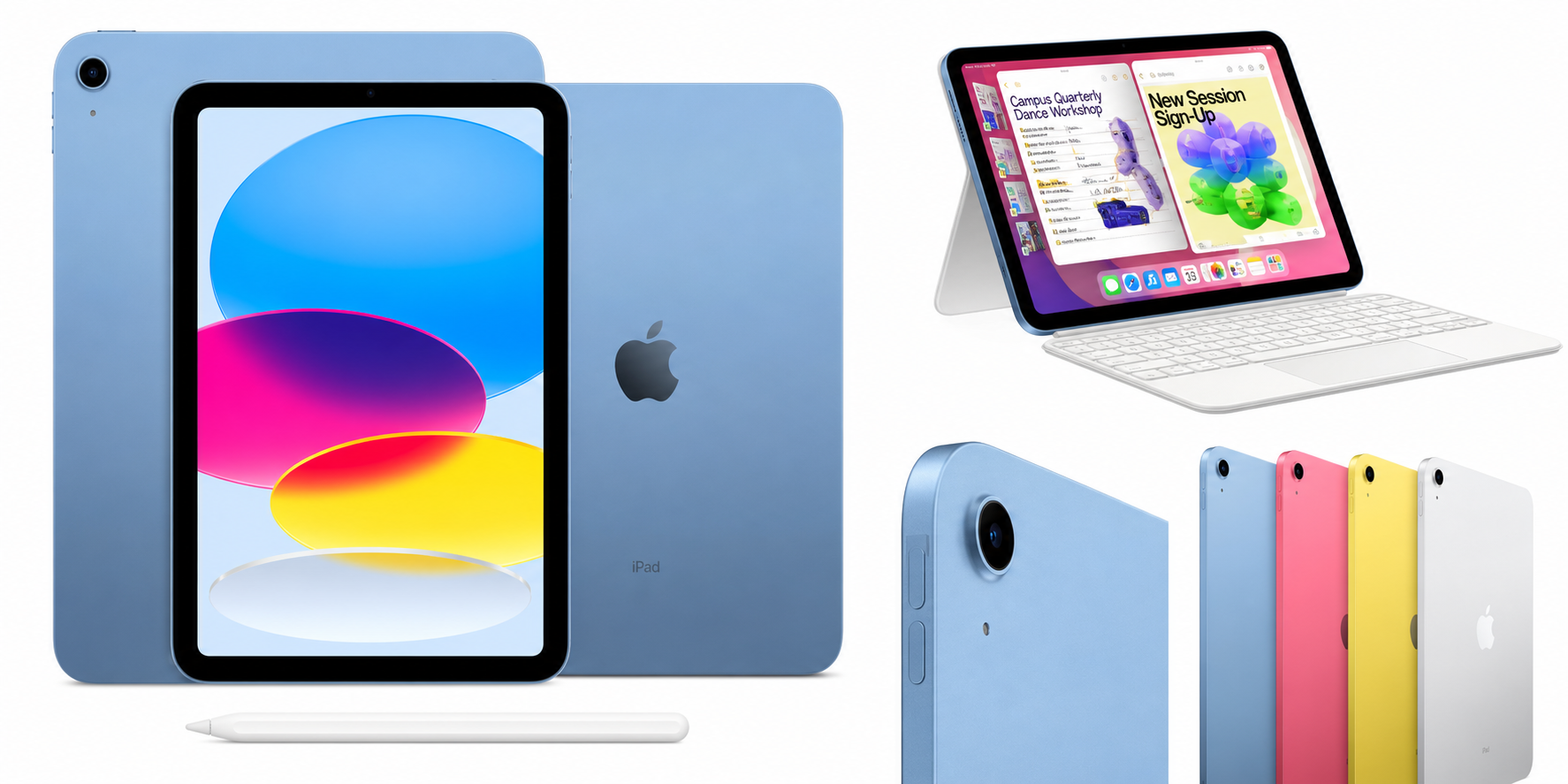
Introduction
The Apple iPad 11-inch (A16 chip, 128GB, Wi‑Fi 6, Blue) is positioned as a versatile, mid‑range tablet that borrows performance characteristics from Apple’s higher-end devices while keeping the design and feature set approachable for students, families, and everyday users. With an 11-inch Liquid Retina display, 128GB of storage, 12MP front and 12MP rear cameras, Touch ID, and all‑day battery life, it aims to be a single device for reading, browsing, streaming, light creative work, and casual gaming.
On retail listings such as Amazon, the iPad 11-inch is typically offered around $379.00, placing it below Apple’s Pro‑grade tablets but above entry‑level budget Android options. That pricing context is important when evaluating how well it balances performance, display quality, and long-term software support.
Typical Use Cases
-
Everyday productivity and web use
- Email, web browsing, office apps (word processing, spreadsheets, presentations)
- Remote learning platforms and video calls
- Cloud services and file management via iCloud, Google Drive, or OneDrive
-
Media consumption and casual entertainment
- Streaming video (Netflix, Disney+, YouTube, etc.) on the 11-inch Liquid Retina display
- Reading e‑books, articles, and PDFs
- Casual games and social media
-
Note‑taking and study use
- Typed notes with Bluetooth or compatible keyboards
- Handwritten notes and annotations using Apple Pencil (generation depends on accessory ecosystem)
- Marking up PDFs and lecture slides
-
Light creative work
- Basic photo editing and organization
- Sketching or simple digital illustration
- Short‑form video editing for social platforms
-
Travel and on‑the‑go computing
- Portable device for flights, commuting, and trips
- Offline content viewing and simple document work
- Quick camera use for scanning documents or capturing photos and videos when you do not want to carry a separate camera
Performance in Each Scenario
1. Everyday Productivity and Web Use
The A16 chip provides more than enough performance for web browsing, document editing, email, and multitasking. iPadOS’s split view and slide‑over features let you comfortably run a browser alongside a note-taking or messaging app. With 128GB of storage, there is room for office apps, documents, and a moderate number of media files, though heavy local file hoarders may find it limiting over time.
Wi‑Fi 6 support helps maintain stable, fast connections on modern routers, which benefits large file downloads, cloud sync, and video calls. The 12MP front camera is suitable for video conferencing, delivering a clear image with adequate detail and color, and typically handles indoor lighting competently.
2. Media Consumption and Casual Entertainment
The 11-inch Liquid Retina display offers a sharp 2360‑by‑1640‑pixel resolution at 264 pixels per inch, which is well-suited for HD and higher‑resolution content. Text is crisp, and colors are vivid for streaming services and games. Viewing angles are strong, and the size is large enough for comfortable movie viewing while still being easy to hold.
Stereo speakers (when used in landscape) provide an enjoyable experience for video and casual music listening. While they do not fully replace dedicated speakers or headphones, the audio output is clear and sufficiently loud for personal use.
For casual gaming, the A16 chip delivers smooth frame rates in popular titles; simpler games run effortlessly, and even more demanding 3D titles remain responsive, though some of the heaviest games may default to medium‑high settings to balance visuals and battery life.
3. Note‑Taking and Study Use
At 11 inches and around 1.05 pounds, the iPad is light enough to carry between classes or meetings. Paired with a compatible Apple Pencil, it becomes a capable digital notebook. Latency is low enough for handwriting to feel natural for most users, and the display size offers ample room for notes and diagrams.
Students can keep multiple note‑taking apps, cloud storage, and reference apps installed without immediately filling the 128GB storage, as long as they manage large media libraries carefully. Battery life is sufficient to last through a typical school or work day with mixed tasks, though sustained heavy use (such as high‑brightness streaming or continuous gaming) will shorten runtime.
4. Light Creative Work
The 12MP rear camera is adequate for capturing reference images, scanning documents, and taking casual photos that can then be edited directly on the device. It is not intended to compete with Apple’s best phone cameras, but for a tablet camera it provides good detail and color.
Photo‑editing apps and simple illustration tools perform smoothly on the A16 chip, particularly when dealing with moderate‑resolution images and simpler brush sets. For multi‑layer, professional‑grade illustration or large 4K video projects, this iPad can still function but is better described as serviceable rather than ideal; memory and storage may become constraints if you routinely work on large project files.
Short‑form video editing for social media (cropping, trimming, adding basic effects) works well and renders quickly. Creators producing longer or more complex videos may experience longer export times compared to higher‑tier Apple tablets or laptops.
5. Travel and On‑the‑Go Computing
The combination of compact dimensions (about 9.79 x 7.07 x 0.28 inches) and modest weight makes the device comfortable to hold in one hand for reading and easy to slip into a backpack. All‑day battery life in mixed use is realistic under typical conditions: browsing, reading, and light media.
For flights or long commutes, downloading content offline and bringing a small Bluetooth keyboard can turn the iPad into a lightweight productivity machine. The absence of cellular connectivity on this configuration means you will rely on Wi‑Fi or mobile hotspots; frequent travelers who need data everywhere may want to consider that when choosing between Wi‑Fi‑only and cellular-enabled variants.
Strengths Across Scenarios
-
Strong overall performance for its class
The A16 chip offers headroom for multitasking, new iPadOS features, and demanding apps. This contributes to a sense of responsiveness that holds up across productivity, entertainment, and light creative workloads. -
Quality 11-inch Liquid Retina display
The screen resolution and color reproduction make text sharp and content visually appealing. It is a good balance between portability and viewing comfort. -
Balanced cameras for a tablet
The 12MP front and rear cameras handle video calls, document scans, and casual photography well, which is helpful for remote learning, work calls, and quick captures. -
All‑day battery life in mixed use
For typical workloads, a full day away from a charger is achievable. This makes it viable as a primary device for students or light office users. -
Long-term software support and ecosystem
As an Apple device, this iPad benefits from extended iPadOS update support and access to a mature app ecosystem optimized for tablets, including productivity suites, creative tools, and educational apps. -
Portability and ergonomics
Its relatively low weight and thin profile make it easy to carry and comfortable to hold for reading, viewing, or drawing.
Limitations Across Scenarios
-
128GB base storage may be restrictive for some users
While sufficient for many, users who store large local video libraries, many high‑resolution games, or large creative projects may find 128GB limiting over time. There is no support for expanding internal storage via microSD. -
Not a full replacement for Pro‑level creative workflows
For artists and video editors working with very large projects, higher‑end iPads or Macs with more memory and storage remain better suited. This model is aimed at light to moderate creative tasks rather than professional production at scale. -
Wi‑Fi‑only configuration limits connectivity flexibility
Without built‑in cellular, the device depends on Wi‑Fi networks or smartphone hotspots when away from home or office, which may not suit all frequent travelers. -
Display lacks some high-end features
While the Liquid Retina panel is sharp and vibrant, it does not target professional color‑critical work or advanced display technologies found in premium or Pro‑tier models. For general users this is not a major drawback, but professionals should be aware of the distinction. -
Price positioned above budget tablets
At around $379.00, the iPad 11-inch sits comfortably in the mid‑to‑upper tier of consumer tablets. Competing devices may offer larger storage at similar or lower prices, though often with weaker performance, shorter update windows, or less optimized tablet software.
Verdict
The Apple iPad 11-inch (A16, 128GB, Wi‑Fi, Blue) is a well-rounded tablet that excels as an everyday device for students, families, and general users who need a combination of performance, portability, and strong app support. It performs reliably across web use, media consumption, note‑taking, and light creative workloads, all supported by long battery life and Apple’s extended software updates.
Its main compromises are the 128GB storage ceiling, Wi‑Fi‑only connectivity, and the absence of pro‑grade display features. For users who primarily stream rather than store large local libraries, and who value responsiveness, build quality, and ecosystem over maximum specs, it represents a solid, future‑resistant choice.
If you are looking for a single tablet to handle day‑to‑day tasks, learning, travel, and casual creativity—and you are comfortable with its mid‑range pricing around $379.00—the Apple iPad 11-inch is a strong option worth considering.