

HP Envy Photo 7975 Review: A Home-Friendly All‑in‑One Focused on Photos
Introduction
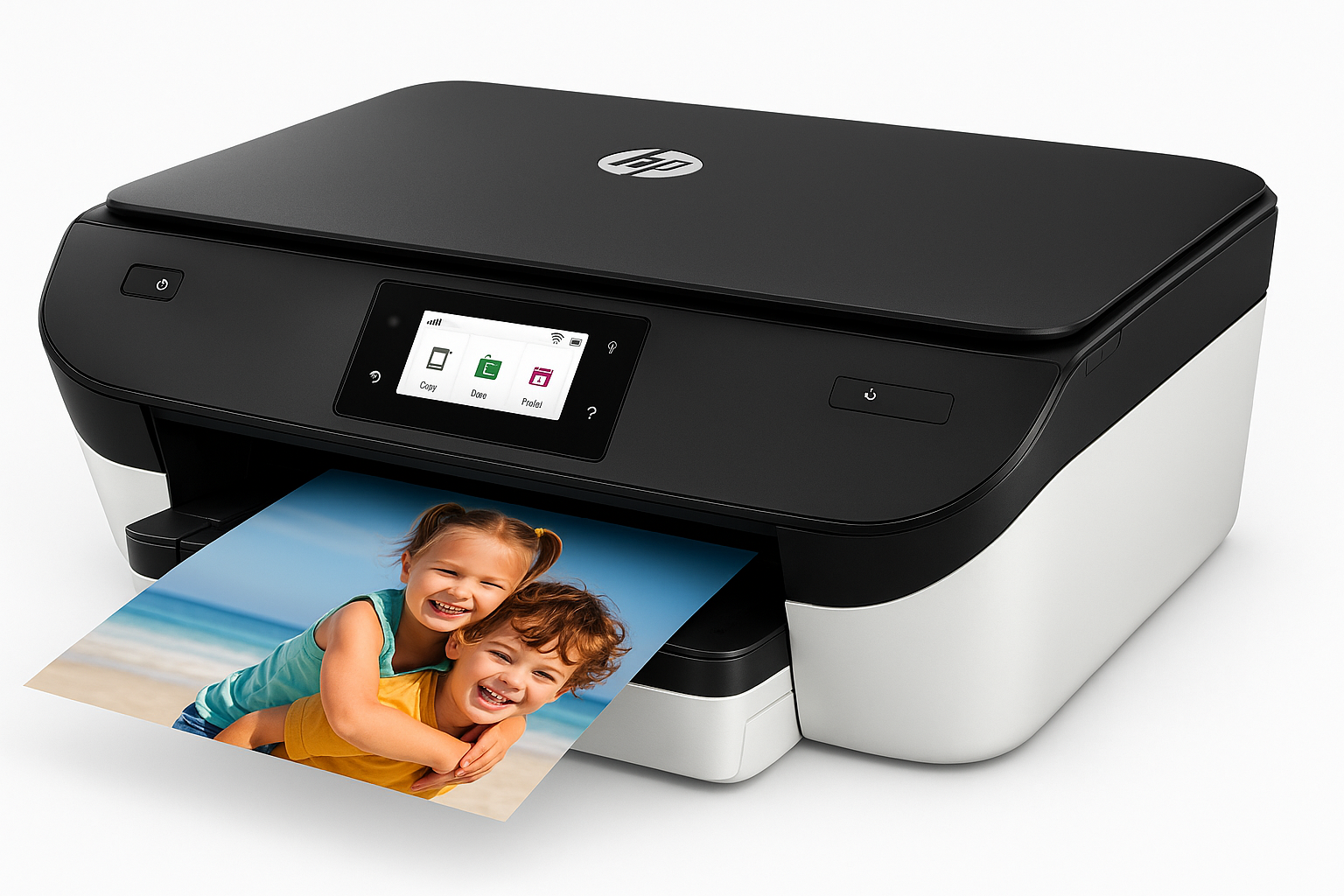
The HP Envy Photo 7975 Wireless Color Inkjet Photo Printer (B63K3A) is positioned as a home‑oriented all‑in‑one for families who want better‑than‑basic photo prints without stepping up to a dedicated photo lab printer. It combines printing, scanning, and copying with mobile and wireless connectivity plus a 3‑month trial of HP Instant Ink, all wrapped in a compact design aimed at everyday desks and home offices.
If you regularly print school assignments, household documents, and 4x6 or 5x7 photos, the Envy Photo 7975 sits in a sweet spot between budget office inkjets and more expensive prosumer photo models. It’s not built for heavy business workloads, but it is tailored for convenient, good‑looking color output at home.
Product overview and key features
The HP Envy Photo 7975 is a color inkjet all‑in‑one that supports printing, scanning, and copying with several home‑friendly touches:
Core specifications
- Functionality: Print, scan, copy (flatbed plus automatic document feeder)
- Technology: HP Thermal Inkjet, 4‑ink system (black + tri‑color)
- Maximum color print resolution: Up to 4800 x 1200 optimized dpi (from a computer, with selected photo papers)
- Automatic duplex printing: Yes, for two‑sided document printing
- Paper handling:
- Main input tray: ~125 sheets plain paper
- Output tray: ~25 sheets
- Dedicated photo tray: Typically handles 4x6 in photo paper for quick borderless prints
- Supports common sizes: Letter, legal, 4x6, 5x7, 8x10, and envelopes
- Automatic document feeder (ADF): For multi‑page scanning/copying
- Display: Color touchscreen (around 2.7 in), used for setup and basic operations
- Connectivity:
- Dual‑band Wi‑Fi (2.4 GHz and 5 GHz, depending on network)
- Wireless Direct / Wi‑Fi Direct style printing
- USB connection for a direct PC link
- Mobile and cloud printing:
- HP Smart app (iOS, Android, Windows, macOS)
- AirPrint support on Apple devices
- Mobile scanning and copy shortcuts via the HP Smart app
- AI‑enabled features: Integrated into the HP Smart ecosystem for guided setup, simplified troubleshooting, and smart tasks (like scan‑to‑cloud, automatic cropping, and document enhancement).
- Instant Ink: Includes a 3‑month trial of HP Instant Ink, HP’s subscription program where you pay per page instead of per cartridge.
Design and build
The Envy Photo 7975 has a clean, home‑friendly design in a light two‑tone finish. It’s compact enough for a shelf or side table yet offers:
- A front‑loading paper cassette for plain paper
- A smaller, separate photo tray to keep photo paper loaded
- Top‑mounted flatbed scanner with an ADF lid
Build quality is typical for a mid‑range home inkjet: plastic construction with smooth curves, more about style and convenience than heavy‑duty durability. Hinges and trays feel adequate for normal home usage, though users planning high monthly volumes might want a more robust office‑class device.
Performance and user experience
Setup and configuration
Initial setup is designed to be simple and app‑driven:
- Unbox, remove packing material, and load the included setup cartridges.
- Power on and follow the on‑screen steps.
- Use the HP Smart app on a phone or computer to connect the printer to Wi‑Fi and finish registration.
The HP Smart app walks you through loading paper, aligning printheads, and optionally enrolling in HP Instant Ink. For most users, this approach significantly reduces the friction of connecting the printer to the home network.
Print quality
Text documents:
- Black text is sharp enough for schoolwork, home office documents, and general correspondence.
- At default settings on standard paper, output is legible and clean, though not as dense as a laser printer.
Color graphics:
- Color charts, presentations, and web pages come out with good saturation and smooth gradients.
- Some banding may appear in solid fills at draft or fast modes, but normal quality mode is generally reliable.
Photo printing:
Where the Envy Photo 7975 justifies its name is photo printing on dedicated photo paper:
- 4x6 and 5x7 prints show pleasing color and detail suitable for albums, scrapbooks, or fridge displays.
- Skin tones are generally natural, and contrast is well‑balanced for family snapshots.
- Borderless printing produces lab‑style edge‑to‑edge prints.
As with most dye‑based inkjets, the paper you choose matters a lot: HP’s own photo papers tend to give the best color consistency and drying performance.
Speed
In day‑to‑day use, the HP Envy Photo 7975 is adequately fast for home workloads, though not aimed at high‑volume printing.
- Simple black‑and‑white pages print quickly enough for light home office or homework runs.
- Full‑color photos, especially at high quality settings, take longer per page, which is typical for this class.
If your priority is cranking out long monochrome reports, a budget laser printer will still outpace this device. For mixed documents and occasional photo jobs, its speed should be acceptable.
Scanning and copying
The flatbed scanner and automatic document feeder make everyday tasks like:
- Digitizing forms and receipts
- Copying ID cards or homework sheets
- Sending PDFs via email or cloud
relatively straightforward.
Using the HP Smart app, you can:
- Scan directly to your phone or tablet
- Automatically crop and straighten documents
- Save or share to cloud storage services
Scan quality is fine for office documents and casual photo archiving, though not on the level of a dedicated photo scanner.
Wireless and mobile experience
The Envy Photo 7975 is built to work well with phones and tablets:
- HP Smart app offers intuitive printing from galleries, files, and cloud accounts.
- iOS and macOS users can typically print via AirPrint without installing additional drivers.
- Wi‑Fi Direct‑style printing allows devices to connect even if they aren’t on the same home network, useful for guests.
Once set up, wireless stability is generally good, though performance can vary in crowded Wi‑Fi environments.
Ink usage and HP Instant Ink
This printer uses HP 64 / 64XL ink cartridges for black and tri‑color. Like many consumer inkjets, traditional cartridge purchasing can feel expensive if you print lots of color pages or photos.
HP heavily promotes Instant Ink, its subscription program:
- You pay per page, not per cartridge, and HP sends ink as needed.
- Photo pages typically count the same as text pages at a given plan level.
- The HP Envy Photo 7975 includes a 3‑month Instant Ink trial, which can be useful to gauge your monthly page volume.
Whether Instant Ink is a good deal depends on your printing habits:
- Light or irregular printers may prefer buying cartridges as needed.
- Families who print a steady volume of photos and color pages every month often find the subscription cost‑effective.
In terms of the printer’s overall value, the ability to pair it with Instant Ink and the fact that the hardware itself is often available around $159.89 on Amazon make it an appealing total package for many home buyers.
Pros and cons
Pros
- All‑in‑one functionality: Print, scan, and copy in one compact device.
- Better‑than‑average photo quality on dedicated photo paper for family snapshots.
- Dedicated photo tray so you can keep 4x6 paper loaded without swapping.
- Automatic duplex printing reduces paper use for long documents.
- Automatic document feeder makes multi‑page scans and copies easier.
- Strong mobile integration via HP Smart app and AirPrint.
- Dual‑band wireless support improves connectivity flexibility.
- 3‑month HP Instant Ink trial to test lower per‑page costs.
- Home‑friendly design that fits easily in living spaces or small offices.
Cons
- Ink costs can add up quickly with standard cartridges if you print a lot in color and don’t use Instant Ink.
- Not built for heavy office workloads; monthly duty cycle is best suited to light‑to‑moderate home use.
- Plastic build and trays feel typical for the consumer segment, not enterprise‑grade.
- Photo output is very good for the price class but won’t match high‑end dedicated photo printers for serious photographers.
- As with many inkjets, occasional users may face cartridge drying or clogging if the printer sits unused for long periods.
Conclusion and recommendation
The HP Envy Photo 7975 (B63K3A) delivers a compelling mix of photo‑centric print quality, wireless convenience, and all‑in‑one versatility aimed squarely at home users. Its strengths lie in producing attractive 4x6 and 5x7 photos, handling typical document tasks, and integrating smoothly with phones and tablets via the HP Smart app.
It’s not the fastest printer, nor the cheapest to run on standard cartridges, but when paired with a suitable Instant Ink plan and used for a balanced mix of documents and photos, it represents solid value for many households—particularly given that it’s frequently available on Amazon for around $159.89.
Recommended for:
- Families who regularly print schoolwork plus photo memories.
- Home offices that need occasional color documents, scanning, and copying.
- Users who want app‑driven setup and easy mobile printing more than enterprise‑grade speed.
If your priorities are crisp black‑and‑white text at very high volumes, a monochrome laser printer will be a better fit. But if you want a single, capable device to handle everyday printing and attractive photo output at home, the HP Envy Photo 7975 is a strong contender worth considering.