

Logitech C922x HD Pro Webcam Review: A Streaming-Focused Upgrade Over Your Built‑In Camera
What This Product Is
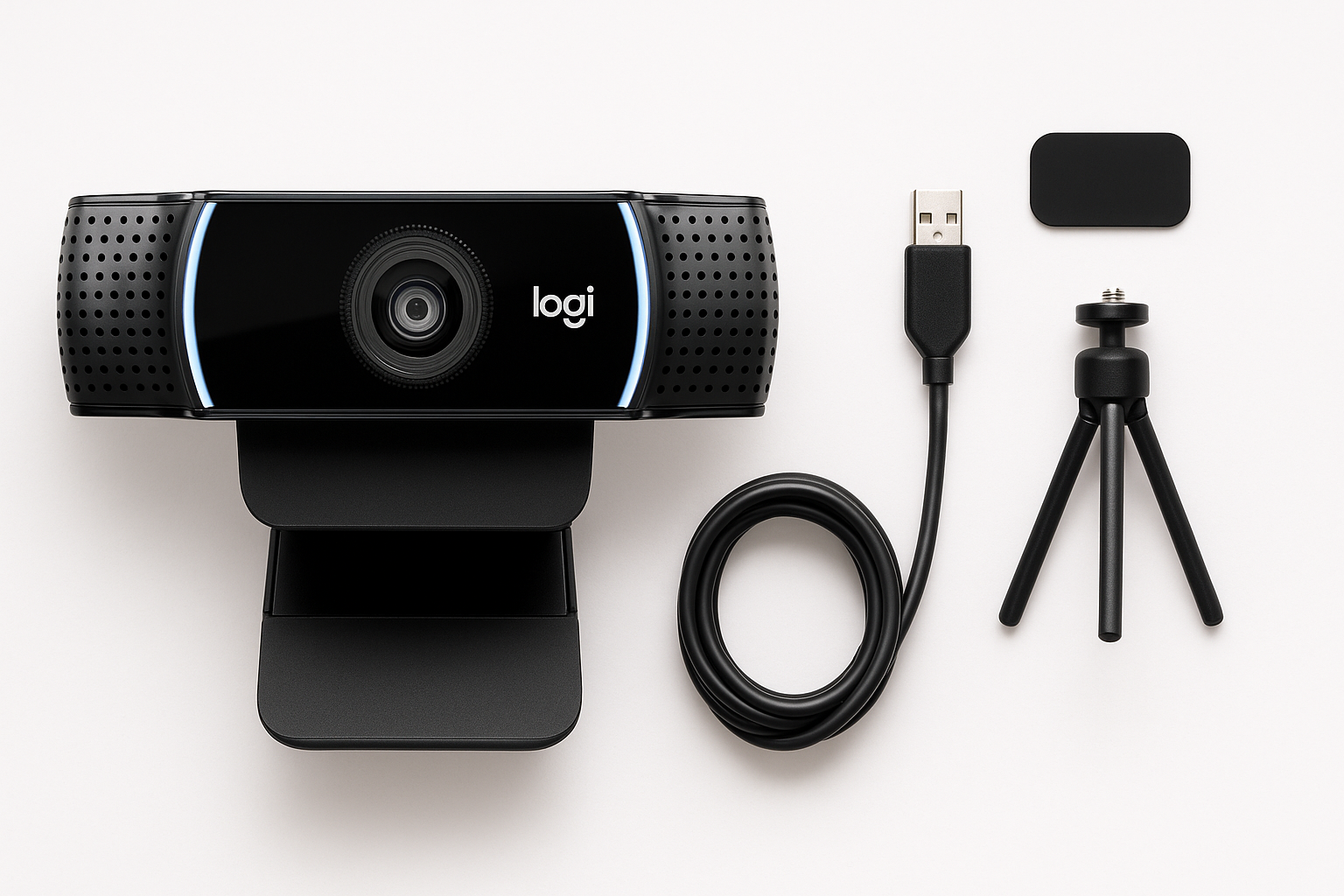
The Logitech C922x HD Pro PC Webcam is a USB 2.0 external camera designed primarily for live streaming and professional‑looking video calls. It supports:
- Full HD 1080p at 30 fps for sharp, detailed video
- HD 720p at 60 fps for smoother motion, ideal for gaming streams or fast‑moving content
Core features include HD light correction, autofocus, a 78° diagonal field of view, and dual omnidirectional microphones for stereo audio. The webcam attaches to most laptop lids and external monitors using its built‑in adjustable clip and also offers a standard tripod thread for more flexible mounting.
As a plug‑and‑play device, the C922x works on most modern versions of Windows, macOS, and ChromeOS without requiring proprietary drivers. It’s also compatible with major communication platforms such as Microsoft Teams, Zoom, Google Meet, and with Nintendo Switch’s GameChat mode when routed through a compatible setup.
If you’re coming from a grainy, low‑resolution built‑in laptop webcam, the C922x is positioned as a mid‑range yet capable upgrade that can deliver notably more professional results without moving into the price or complexity of DSLR or mirrorless camera setups. On Amazon, it typically sits around $104.98, depending on sales and stock.
Why It Matters
In an era where video presence is part of everyday work and social life, a reliable webcam has become essential. Built‑in laptop cameras often lag behind in resolution, low‑light performance, and color accuracy. The Logitech C922x aims to solve those weaknesses by offering:
- Clear, full‑HD image quality suitable for business meetings, online teaching, interviews, and streaming
- Smoother 60 fps output at 720p, which can make gameplay streams and demonstrations look more fluid
- Automatic exposure and focus adjustments, reducing the need for manual tweaking
For streamers, educators, and professionals, the C922x can be the difference between looking like you’re calling from a dim, noisy webcam and presenting a clean, confident on‑screen presence. Its reputation as a widely supported, OBS‑friendly streaming webcam also makes it a common recommendation for those building their first streaming or content‑creation setup.
Key Advantages
1. Flexible Resolution and Frame Rate Options
The standout capability is the choice between 1080p at 30 fps and 720p at 60 fps.
- 1080p/30 is well‑suited to video calls, lectures, and general content where clarity and detail are the priority.
- 720p/60 is a strong option for Twitch or YouTube Gaming streams where motion smoothness and responsiveness are more important than maximum resolution.
Having both modes available gives you flexibility to match your bandwidth and platform requirements.
2. HD Light Correction and Autofocus
The C922x includes HD light correction, which automatically adjusts exposure and white balance to keep your image reasonably bright and natural‑looking even in less‑than‑ideal lighting conditions. While it doesn’t replace a proper lighting setup, it does a noticeably better job than most integrated laptop webcams in dim rooms.
The autofocus system helps keep your face sharp if you move closer to or farther from the camera or hold objects up to the lens (for example, showing products, documents, or devices during a call or stream).
3. Dual Stereo Microphones
Two omnidirectional microphones flank the lens, capturing stereo audio. For many users, this eliminates the need for a separate USB microphone, at least initially. Voices generally sound clear enough for everyday calls, online classes, and casual streaming.
That said, dedicated microphones will still outperform the built‑ins for critical recording or professional streaming setups. But as an all‑in‑one package, the C922x’s integrated mics are convenient and adequate for most general uses.
4. Broad Platform and App Compatibility
The C922x is recognized as a standard UVC (USB Video Class) device, meaning it works with:
- Windows PCs and laptops
- macOS systems
- Many ChromeOS devices
- Popular apps such as Teams, Zoom, Google Meet, Skype, and common streaming tools like OBS Studio and XSplit
This broad compatibility reduces friction when moving between different machines or software. If your computer can recognize a typical USB webcam, it will almost certainly handle the C922x.
5. Adjustable Mounting and Tripod Support
The built‑in clip makes it easy to mount the webcam on:
- Slim notebook displays
- Thicker external monitors
The hinge allows basic angle adjustments, so you can tilt the camera to frame yourself properly. The threaded mounting point on the base lets you attach the C922x to a standard tripod, which is useful if:
- Your monitor is too low or too high
- You want a side or three‑quarter angle rather than straight‑on framing
- You’re recording from a standing desk or more complex set
6. Stream‑Ready Feature Set
While it can serve as an everyday webcam, the C922x’s feature mix clearly targets streamers and content creators:
- 720p/60 fps mode for smooth gameplay capture
- Decent low‑light handling for bedroom or small‑room setups
- Plug‑and‑play integration with OBS and similar tools
For someone starting on Twitch or YouTube, it’s a straightforward way to get a competent camera feed without learning camera body settings, lenses, or capture cards.
Key Limitations
1. No Built‑In Privacy Shutter
Unlike some more recent Logitech models, the C922x does not include a physical privacy cover. If you care about privacy when the camera is not actively in use, you’ll need to:
- Use a third‑party privacy cover that sticks onto the frame, or
- Rely on unplugging the webcam or disabling it in software
2. Image Quality Still Limited by Small Webcam Sensor
Compared to built‑in laptop webcams, the C922x represents a meaningful upgrade. But when compared to mirrorless or DSLR cameras feeding through a capture card, its image will still appear more compressed, with less dynamic range, and occasionally more noise in very low‑light conditions.
Users expecting cinema‑level quality may be disappointed; this is still a consumer webcam, not a large‑sensor camera.
3. USB‑A Only and Cable Length Constraints
The webcam connects via an attached USB‑A cable. On modern ultrabooks or Macs that offer mainly USB‑C ports, you’ll need an adapter or hub. Additionally, because the cable is permanently attached and of fixed length, you have limited freedom to place the camera far from your computer without adding USB extensions.
4. Occasional Driver and Recognition Issues
While the C922x is generally plug‑and‑play, a subset of users report intermittent issues such as:
- The camera not being recognized after unplugging and replugging
- Conflicts with certain versions of Windows or specific USB ports
- Needing to reinstall Logitech software or switch to generic drivers when problems arise
These issues aren’t universal, but they’re worth noting if you rely on a single machine for critical work. In most cases, they’re resolved by standard troubleshooting (trying another USB port, removing older camera apps, updating drivers and OS, or testing on another computer), but they can be frustrating if they occur right before an important call.
5. Field of View and Zoom Control
The C922x’s 78° field of view is a good middle ground for single‑person framing at a desk, but there are limitations:
- It may feel a bit wide in very tight spaces, showing more of your background than you’d like.
- The camera relies on digital zoom via software rather than optical zoom, so zooming in too far can reduce apparent sharpness.
For many users this is acceptable, but those needing tighter or more variable framing might prefer a camera with more advanced FOV or zoom controls.
Who It’s For
The Logitech C922x HD Pro Webcam is best suited for:
- New and intermediate streamers who want a reliable, mid‑range webcam with 720p/60 streaming support without jumping into more complex camera setups.
- Remote workers and professionals who spend considerable time on Teams, Zoom, or Google Meet and need a clear, stable image that surpasses integrated cameras.
- Online teachers, tutors, and coaches who want their video to look professional enough to build trust and engagement with students or clients.
- Content creators on YouTube or social platforms making talking‑head videos, tutorials, or product demos, particularly when starting out.
- Gamers using Nintendo Switch GameChat via a PC capture setup and wanting a webcam that plays well with streaming software.
If you fall into these categories, the C922x provides a balanced combination of quality, features, and accessibility.
Who Should Skip It
You may want to look elsewhere if:
- You need top‑tier image quality for commercial video, cinematic projects, or high‑end branded content. In that case, a mirrorless/DSLR plus capture card (or a premium higher‑end webcam) will serve you better.
- You require a built‑in privacy shutter and don’t want to rely on third‑party covers, unplugging the webcam, or software controls.
- Your laptop or desktop only has USB‑C ports and you prefer fully native USB‑C accessories; while an adapter solves the issue, it’s another piece of gear to manage.
- You already own a solid recent webcam (like a Logitech C920‑series model) and only need minor improvements. The jump from a decent 1080p webcam to the C922x may not justify the upgrade unless 720p/60 streaming is particularly important to you.
- You’re extremely sensitive to occasional driver quirks or use very locked‑down corporate machines where installing drivers or troubleshooting USB devices is difficult.
Final Recommendation
The Logitech C922x HD Pro PC Webcam remains a strong all‑round choice for users who need more than what a built‑in laptop camera can offer but aren’t ready to invest in a full camera‑plus‑capture‑card setup. With 1080p/30 and 720p/60 video, automatic light correction, dual microphones, and broad software compatibility, it’s particularly appealing to streamers, remote professionals, and online educators.
Its main drawbacks—no privacy shutter, USB‑A dependency, and the inherent limitations of a small‑sensor webcam—are manageable for most people in its target audience. When found around $104.98 on Amazon, it offers good value for the performance and features it delivers.
If you’re building or upgrading a home office or streaming setup and want a dependable, widely supported webcam that noticeably improves your on‑screen presence, the Logitech C922x is an easy model to recommend.